
Want to see it in action? Try anyLogistix Sandbox today and start exploring ready-made supply chain scenarios directly in your browser.
Every year, the anyLogistix Conference brings the supply chain community together to look beyond daily tasks. It’s a chance to see what’s changed over the year, what’s coming next, and how new ideas can help teams make better decisions.
This year’s anyLogistix conference featured six presentations from experts across business and academia. They covered a wide range of topics, from urban delivery and energy logistics to digital twins, FMCG supply chains, production planning, and supply chain design.
If you missed the event, you can visit the anyLogistix Conference 2026 page to explore the full list of presentations.
This recap focuses on the anyLogistix product update: recent improvements, upcoming features, and their value in supply chain projects.
Contents:
Getting started with supply chain modeling can feel difficult. You need the right data, the right setup, and often some time before the first useful result appears.
The new anyLogistix Sandbox helps remove that barrier.
Sandbox is a free online version of anyLogistix that you can open directly in your browser. There is no need to wait for a demo environment or install anything locally. You can sign up, choose a built-in example, and start working with the product right away.
And this is not just a limited product tour. Sandbox gives you a real anyLogistix experience, designed for smaller-scale scenarios.
The value is simple: you can move from “this looks interesting” to “I am already testing a scenario” much faster.
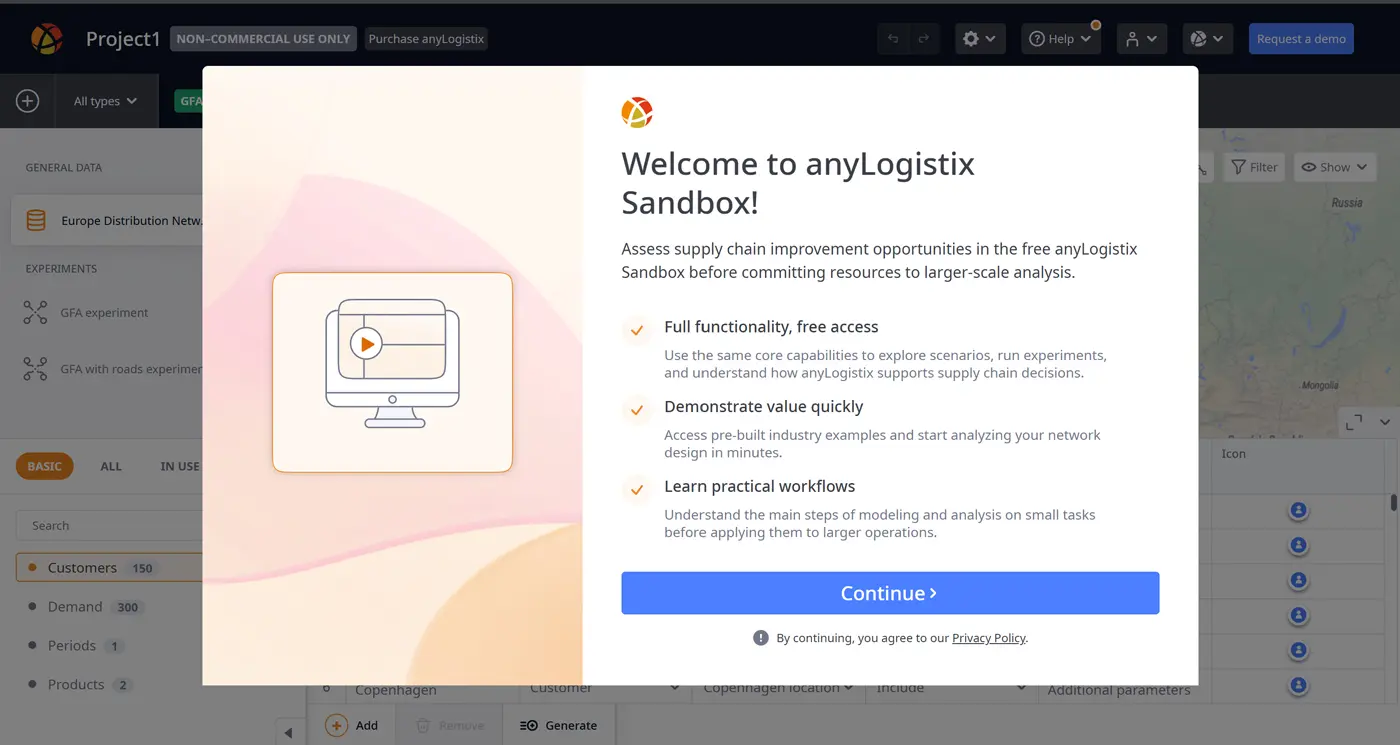
anyLogistix Sandbox welcome screen (click to enlarge)
Sandbox is not only useful for new users but also for demos, customer conversations, training, and early testing of new features. Instead of starting from an empty workspace, you can open ready-made examples and explore scenarios that are already close to real business problems.
The example library also became easier to use. Examples can be filtered by industry, searched by name or description, and opened with detailed explanations of the business problem, solution logic, and results.
Want to see it in action? Try anyLogistix Sandbox today and start exploring ready-made supply chain scenarios directly in your browser.
Last-mile delivery is one of the most challenging parts of logistics. Delivery windows, vehicle capacity, customer orders, facility working hours, loading gates, and return trips all affect the final result.
The Last-mile optimization experiment helps you build more realistic routing plans while respecting these real-world constraints.
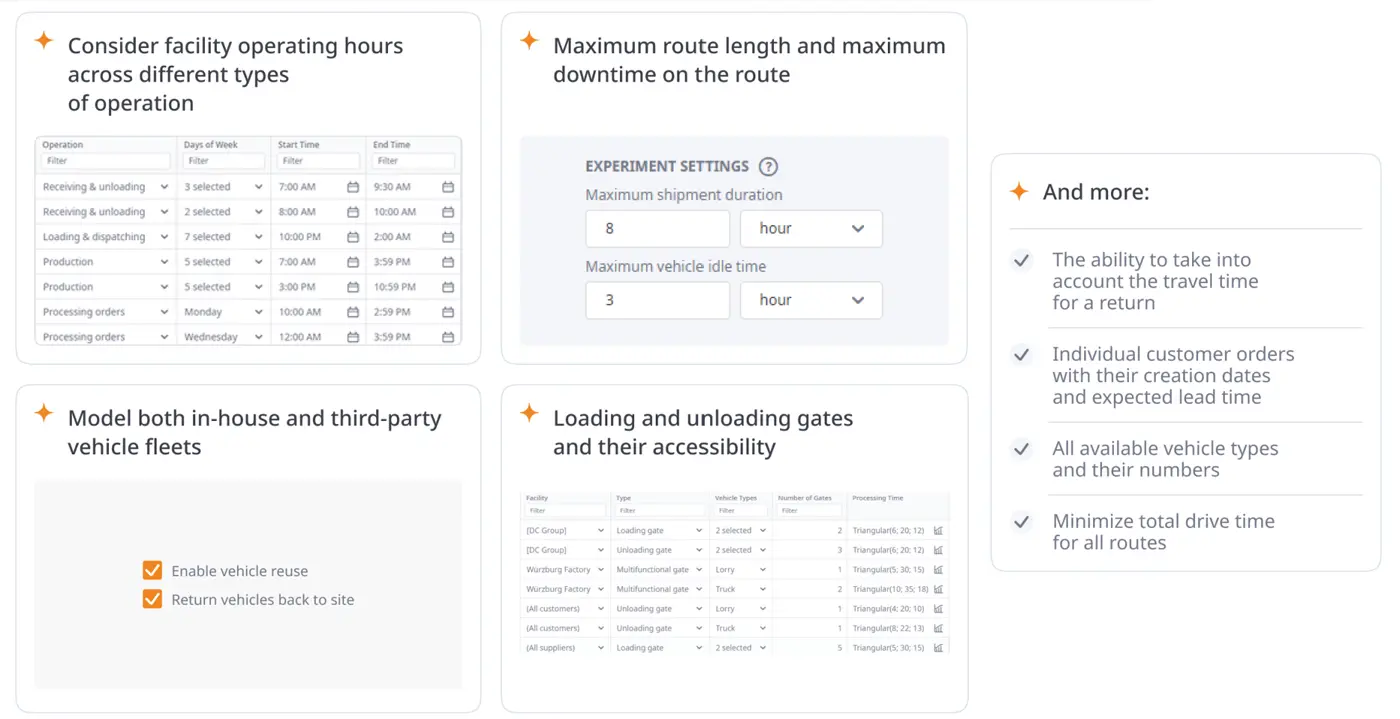
Last-mile optimization experiment (click to enlarge)
In the presentation, this was shown with a flower delivery example. First, the baseline simulation scenario was run to check the initial KPIs, including total cost, profit, and total travel distance. Then, the Last-mile optimization experiment created improved milk runs and shipment schedules.
The result was clear: total costs decreased by 8%, profits increased by 3%, and total travel distance dropped significantly.
Watch the full presentation below to see how the workflow works in anyLogistix.
In real supply chain projects, decision-makers rarely want to compare everything at once. They usually need answers to specific questions:
You can select simulation results, choose the metrics to compare, and create a focused comparison table. The table can be filtered, sorted, exported to Excel, and displayed in different units when conversion rules are available.
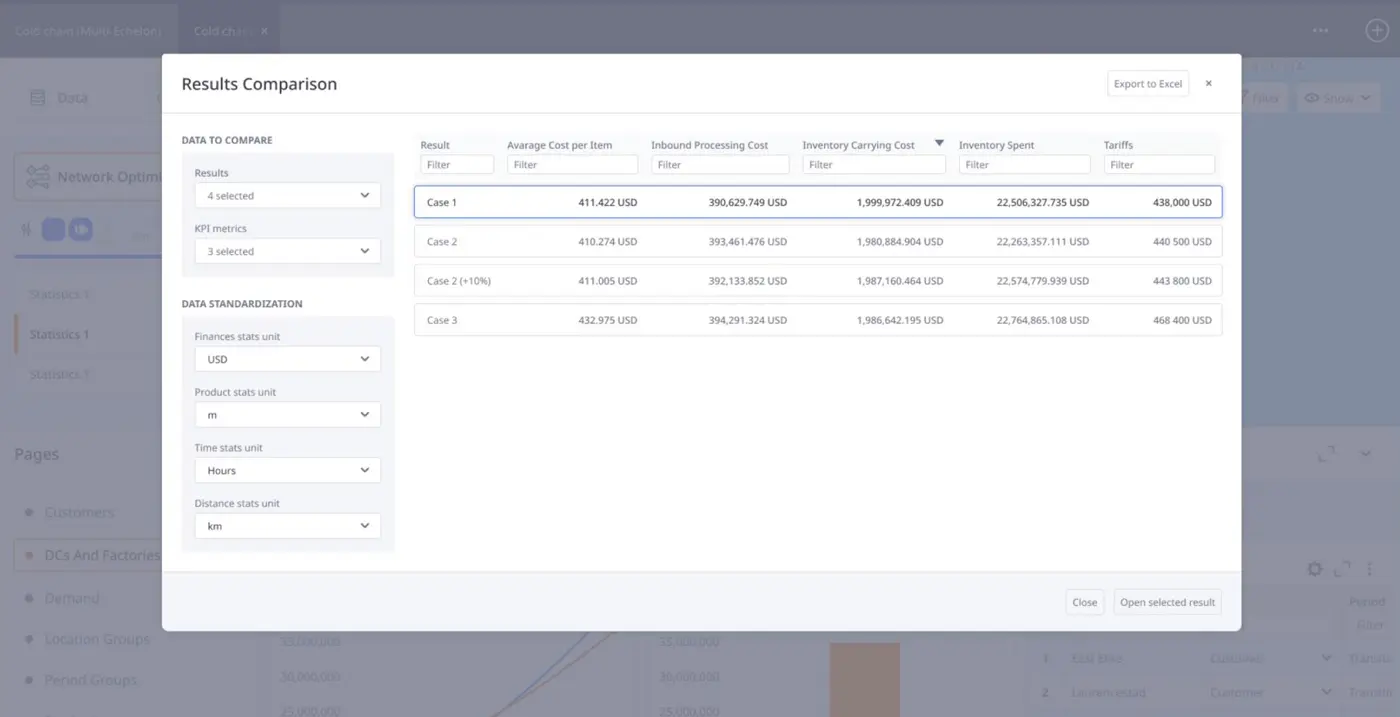
New results comparison feature (click to enlarge)
Another important update is support for production lines in simulation-based scenarios.
Previously, production would often be represented as a high-level capacity number. Now, you can describe factory behavior in much more detail. You can define production lines, product priorities, changeovers, queue rules, and how different products occupy available production lines.
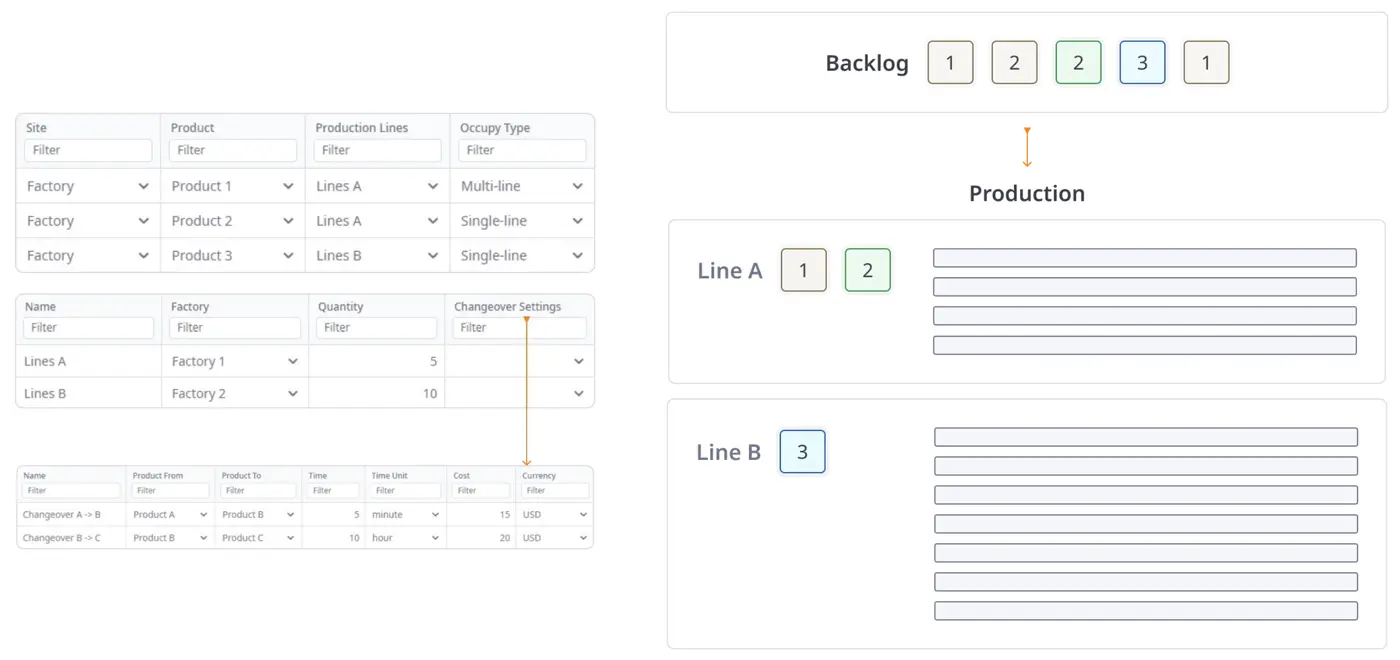
Production line logic in anyLogistix (click to enlarge)
This makes it possible to explore questions such as:
The results also became more detailed. You can see when each production order was created, when production started and finished, whether a changeover occurred, and what costs were connected with the process.
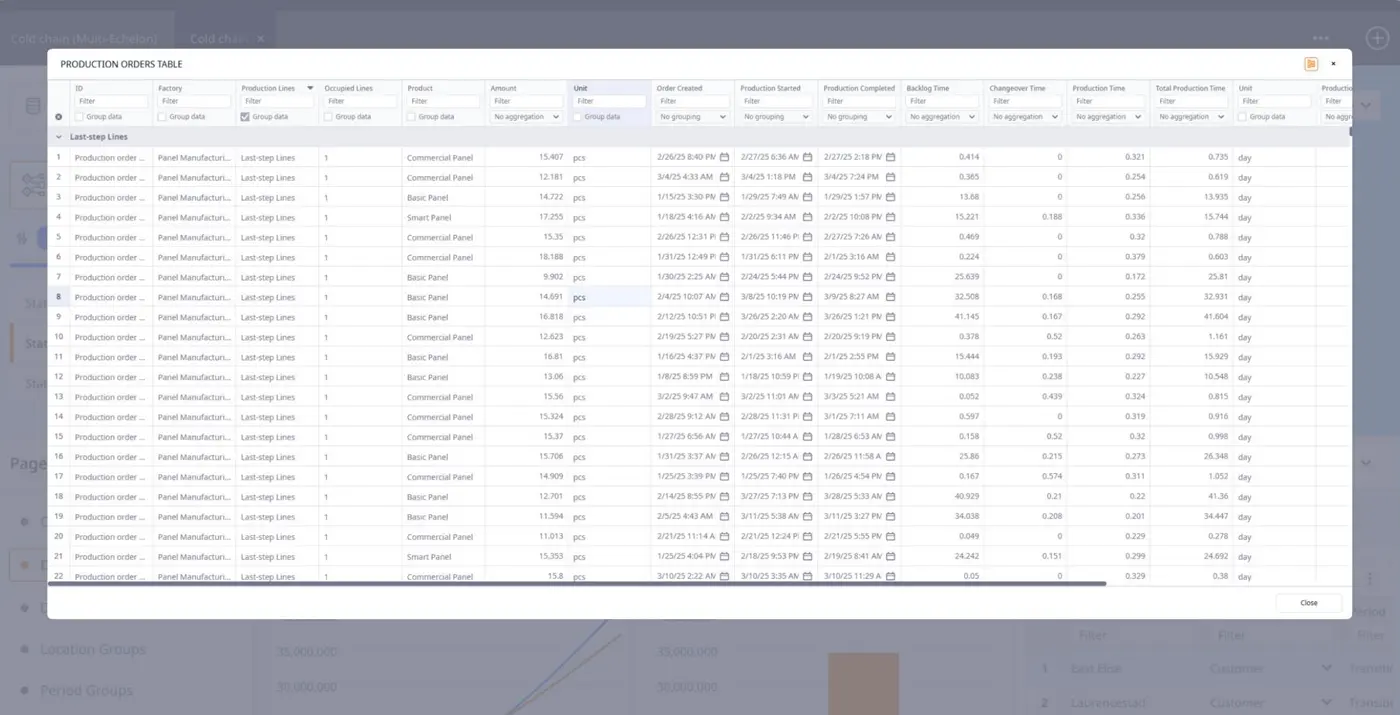
Detailed production order results in anyLogistix (click to enlarge)
The presentation also offered a look at the next improvements planned for anyLogistix. Some of them are small on paper but very useful in daily modeling work.
A new total demand type will make it easier to work with demand data that comes as one value for a full period, such as a month or quarter. This is common in real projects. Sometimes, companies do not have detailed period-by-period demand data ready. They just have total demand and want to start modeling.
With this update, you will not need to restructure the data just to fit the model format. The setup becomes faster, simpler, and closer to how business data often looks in practice.
anyLogistix will also introduce new transportation cost calculation methods. These updates will help you model more realistic tariff structures, including product-based costs, distance-based costs, fixed delivery costs, and distance ranges.
This is useful when transportation pricing depends on delivery zones, tariff intervals, or separate cost components such as shipment volume, distance, and fixed trip cost.
In other words, you will have more flexibility where it really matters: at the input level.
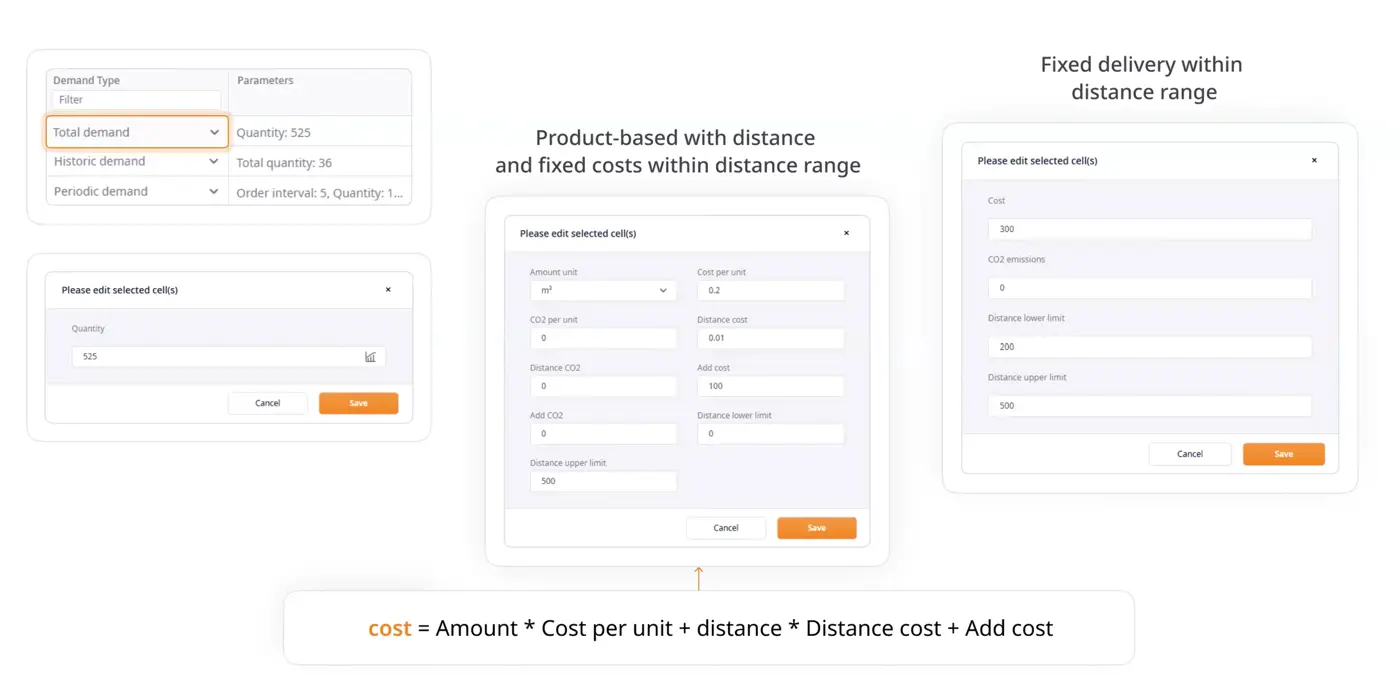
Upcoming features in anyLogistix (click to enlarge)
Another upcoming improvement is the ability to run a simulation until a specific date or for a specific period of time. It sounds simple, but it can save a lot of time.
In real work, users often do not want to run the whole model horizon again and again. They may want to stop at a specific moment: when inventory drops, when a replenishment arrives, or when something unusual starts happening in the model.
With this update, you will be able to move directly to that point, pause the model, explore the results, and then continue running it from there.
One of the biggest highlights of the presentation was the Cost to serve experiment.
If last-mile optimization answers the question “How can we deliver better?” cost to serve answers another important question: “What does it actually cost us to serve this customer, product, or flow?”
This changes the conversation.
Instead of looking only at which network is better overall, you can analyze where costs appear, what drives them, which customers are profitable, and where margin is being lost.
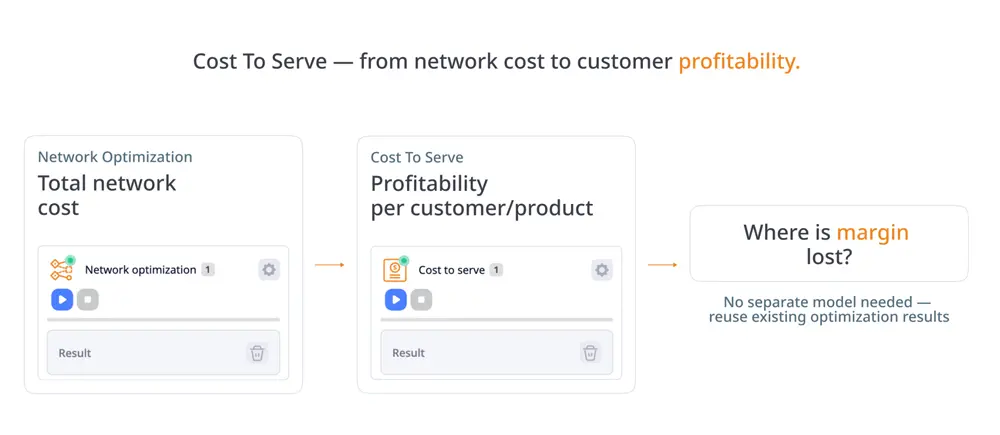
Cost to serve analysis in anyLogistix
The experiment is built as an extension of network optimization. This means you do not need a separate heavy setup to start analyzing profitability. You can use an existing optimization result and calculate cost to serve on top of it.
The results can be viewed by destination, by product, by customer-product flow, and in a detailed route breakdown.
Cost to serve results are powerful in tables, but sometimes you just need to see the structure immediately. That is why we are also working on Sankey graphs for Cost to serve results.
The new visualization will show how products and costs flow through the network. You will be able to see which flows matter most, which nodes carry the biggest share of cost, and where they should focus first.
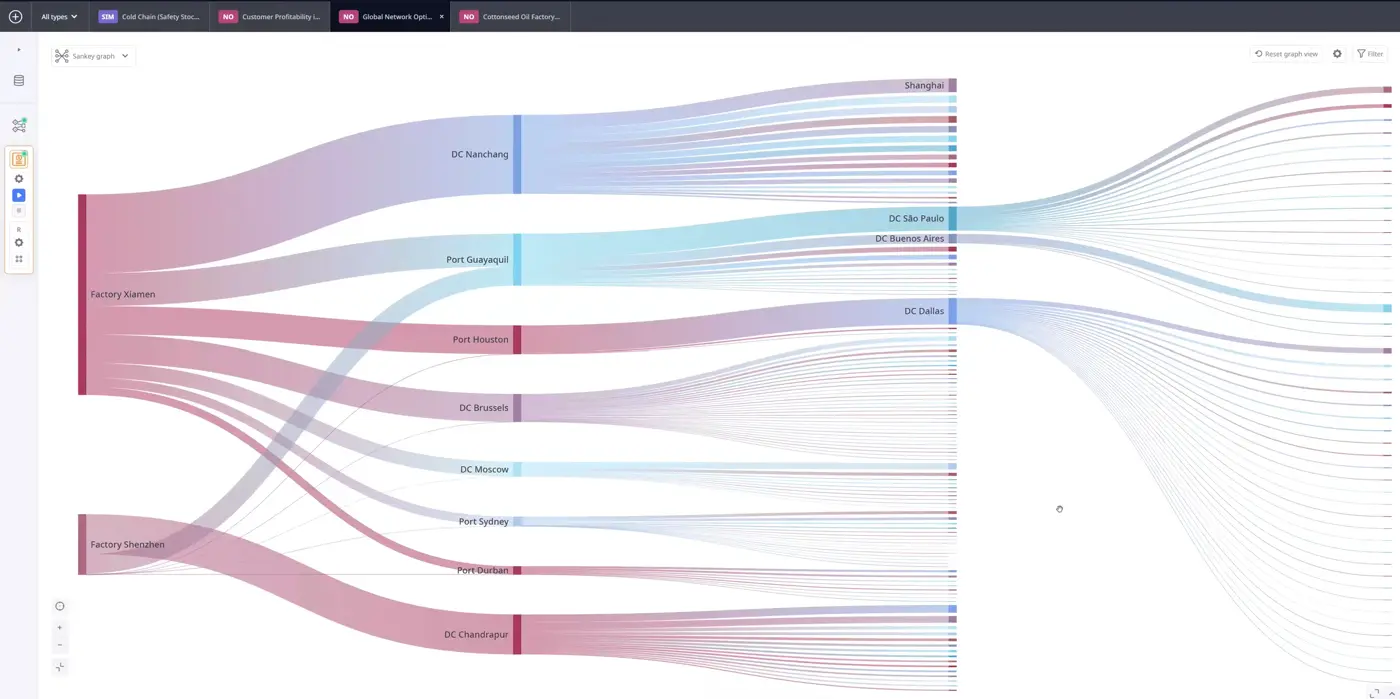
Sankey graph for Cost to serve results (click to enlarge)
You will be able to switch between key metrics, split products, filter profitable and unprofitable flows, and click on nodes or flows to see more details.
Our roadmap also includes several broader directions:
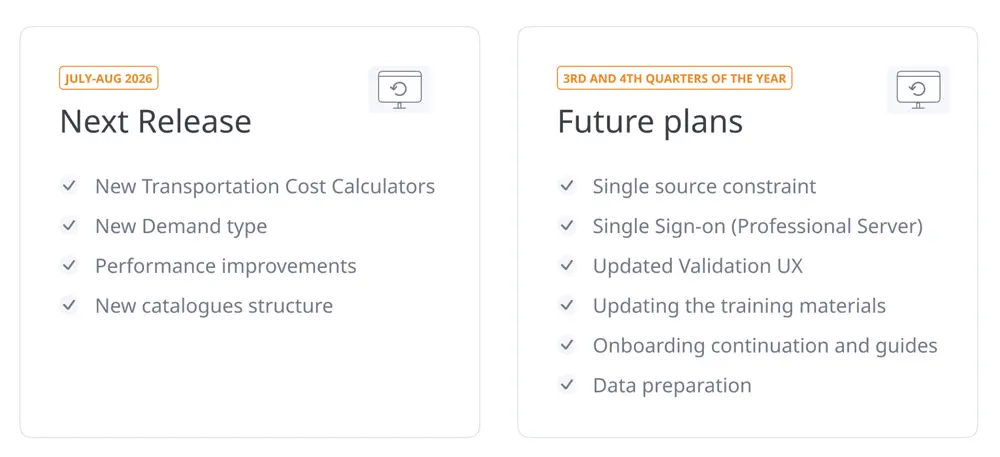
Future plans of anyLogistix supply chain software
anyLogistix is also moving toward rebranding. This is not only about a new look. It is about making the product clearer, more consistent, and easier to understand.
Because supply chain software should not only solve complex problems. It should also make that complexity easier to work with.
Although this post focuses on the anyLogistix product update, the full conference agenda showed how widely supply chain modeling can be applied.
Speakers covered last-mile routing for hyper-local food delivery, LPG distribution network optimization, digital twins and AI, FMCG supply chain planning, and best practices for supply chain design and optimization projects.
Together, these presentations showed how simulation and optimization can support very different industries, regions, and business challenges.
Visit the anyLogistix Conference 2026 page to explore all the presentations from the event.
At the anyLogistix Conference 2026 we showed how much the product has evolved in one year.
Sandbox makes it easier to take the first steps and start exploring supply chain scenarios. Last-mile optimization and production line modeling bring those scenarios closer to real operations, while result comparison and cost to serve help turn complex outputs into clearer business decisions.
And with the upcoming roadmap, anyLogistix continues moving in the same direction: making supply chain modeling more accessible, more practical, and more useful for real decision-making.
Explore what’s new, try the latest anyLogistix features, and start building smarter supply chain decisions today.