
See it on your own network. Register for the free anyLogistix Sandbox and simulate disruptions, tariffs, and demand changes. It runs in your browser, needs no installation, and has no expiration date.

Be honest: when your supply chain planning software hands you a plan, do you trust it, or do you quietly open Claude and ask it to validate the findings?
Many planners do some version of the second. They export the plan to a spreadsheet, ask a colleague to sanity-check it, or paste it into a chatbot. The doubt is healthy and common. In BCG's Supply Chain Planning 2026 report, more than 70% of companies had invested in advanced planning systems, but only about one in five said automation, optimization, or AI had delivered meaningful value. A plan on screen looks precise, but nobody has seen it run through a bad month.
A chatbot can help you read the plan. It cannot show you what happens when a supplier is three weeks late and demand jumps at the same time. A simulation can: you run the plan through a model of your network and watch where it bends.
In this article we investigate how simulation does that and where AI fits in the flow as an assistant.
Contents:
AI is useful in supply chain planning, mostly as support for the people who plan. According to BCG, it adds the most value today in four assisting roles:
These tasks speed up the work around the plan. None of them decides whether the plan is viable. Vendors promise more: Gartner predicts half of supply chain management solutions will include AI agents by 2030, with these agents making and executing decisions on their own. But an AI feature in the supply chain planning software is not evidence that a plan will hold.
But every AI model learns from the past. That creates three blind spots in supply chain planning.
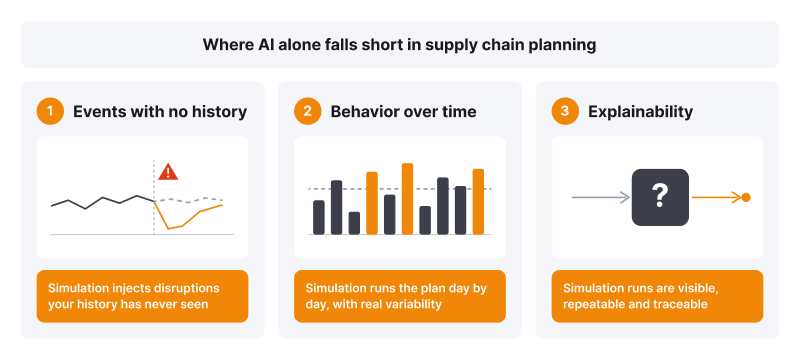
AI learns from the past. Simulation tests the plan against events your history has never seen, shows how it behaves day by day, and keeps every run traceable
This is why BCG concludes that fully autonomous planning is still aspirational. Only 7% of the leaders it surveyed report value from agentic or GenAI applications so far.
The same gap shows up for AI itself. In PwC's 2025 Digital Trends in Operations Survey, 59% of 610 operations and supply chain leaders already use AI. Yet 92% say their tech investments have not fully delivered, most often because of integration complexity and data issues.
A stress test asks a simple question: what happens to this plan when the world does not follow the forecast? In anyLogistix, you answer it by defining the disruptions yourself. Six event types cover the most common shocks.
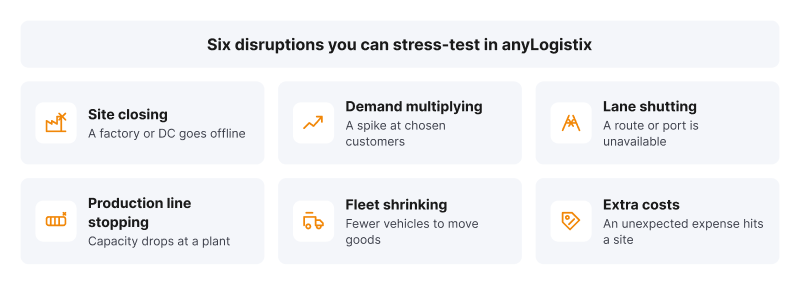
Each disruption is an event in the anyLogistix model. Set its probability and timing, chain it to other events, then compare results across replicated runs
Each event gets its own likelihood and time window, and one event can trigger another, so a port closure can cascade into a DC shutdown.
Supply chain simulation answers it. It builds a working model of your network, with sites, lanes, lead times, capacities, and inventory rules, and runs the plan through time with realistic variability. Replicated runs then turn one result into a range. Instead of one number, you get a range of outcomes and the exact points where the network strains.
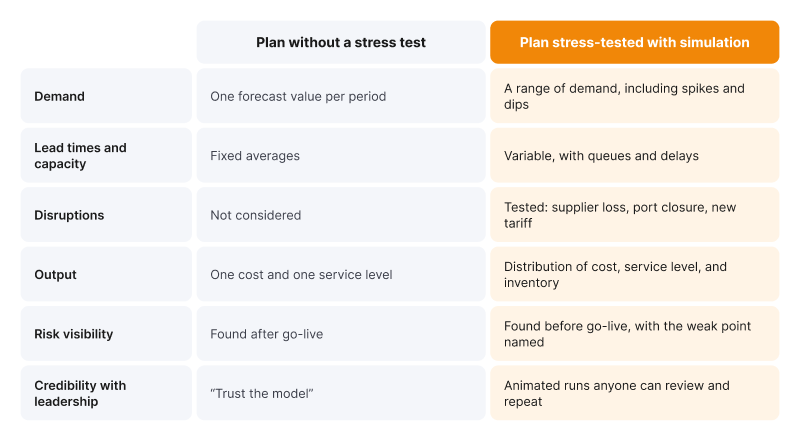
Plan without a stress test vs. plan stress-tested with simulation
How does stress-testing pay off? These anyLogistix projects combined supply chain optimization to find the best design with simulation to check that the design holds.
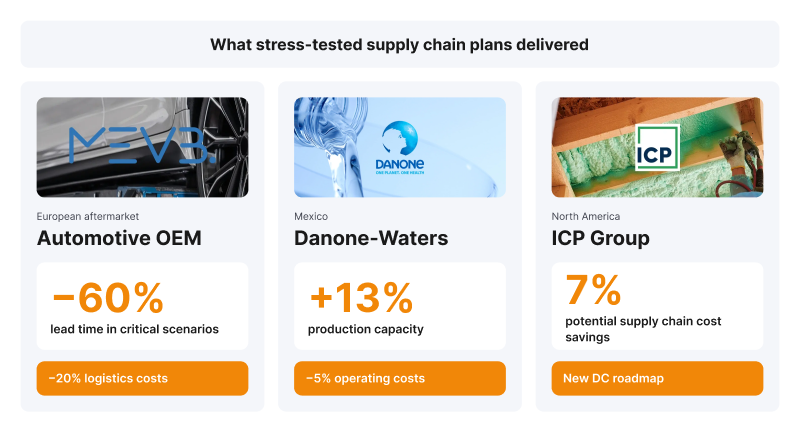
Case studies: MEVB Consulting GmbH, VP Consulting and Danone-Waters Mexico, and ICP Group with SimWell
In each case, the team did not accept the first good-looking plan. They compared alternatives under pressure and chose the one that held.
anyLogistix brings the main supply chain planning methods together in one model of your network. You can design the network, optimize it, run it through time, and check its risks without moving data between tools:
For teams, anyLogistix Professional Server turns the model into a shared workspace. It runs on your own server, so your supply chain data stays in-house, and planners open projects in a web browser on any device, including tablets. Colleagues can share projects with each other, while an administrator manages users and licenses. Professional Server also includes the anyLogistix API for Java and Python, so you can connect the model to your own systems and scripts.
To see anyLogistix Professional Server in action, check out the demo video with the anyLogistix Support Team Lead.
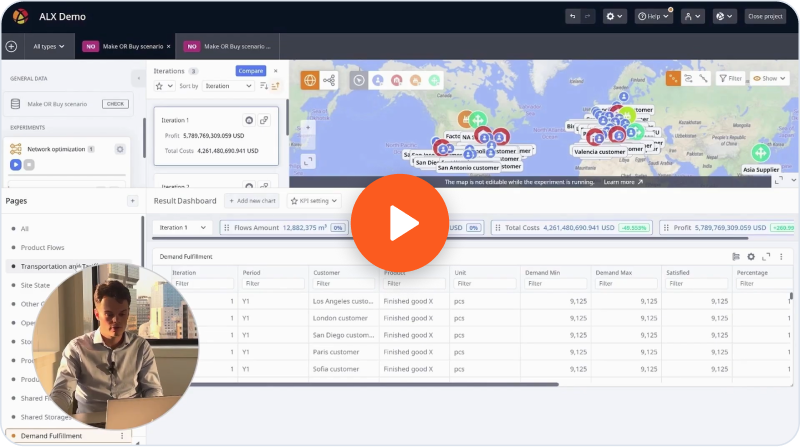
Watch the demo
Whether it's a colleague, a script, or an AI tool interacting with the model, the model remains the single source of truth. That is why AI follows the same rule here as in the rest of this article: it assists. anyLogistix is exploring AI to streamline workflows around the model, such as turning spreadsheets into a valid scenario and summarizing what changed in a run. The solver and the simulation engine stay deterministic, so every number points back to a run you can reproduce.
See it on your own network. Register for the free anyLogistix Sandbox and simulate disruptions, tariffs, and demand changes. It runs in your browser, needs no installation, and has no expiration date.
You can add stress tests to your current supply chain planning process without replacing your systems. Start small, with one decision that matters.
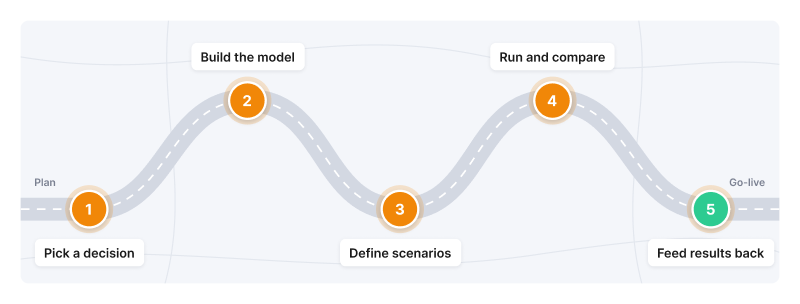
From plan to go-live in five steps
Maturity pays off. BCG found that the most mature planning organizations beat the least mature on forecast accuracy by more than 25 percentage points.
Want the method in depth? Check out "Managing Risks in Supply Chains with Digital Twins" by Prof. Dmitry Ivanov or "Simulation-Based Inventory Planning for the Digital Supply Chain Era." Both are free.
Supply chain planning is the process of matching supply with demand across a network: what to make, buy, store, and ship, and where and when. It covers long-term network design, mid-term sales and operations planning, and short-term production and distribution plans.
A typical cycle includes demand planning, supply and capacity planning, inventory planning, and sales and operations planning (S&OP), followed by execution and review. A stress test with simulation before execution shows whether the plan will hold.
Supply chain optimization finds the best plan for a given goal and set of constraints. Supply chain simulation runs that plan over time with variability and disruptions and shows the range of results you can expect.
Choose a tool that models your real network, combines optimization and simulation, compares scenarios on business KPIs, and imports data from your ERP. The fastest way to judge is to test it on a real decision, for example, in the free anyLogistix Sandbox.
Mainly as an assistant: for demand forecasting, exception alerts, data interpretation, and workflow automation. It supports planners but does not replace testing. Any plan it suggests still needs to be checked in supply chain planning software.
So, back to where we started. Next time you are at the supply chain planning stage, go ahead and ask Claude what it thinks. Just don't stop there. Put the plan in a model and simulate everything you could think of. Then walk into the planning meeting with proof.
Want to go deeper into how AI and simulation work together in supply chain planning? Register for the free webinar, "Beyond the Hype: Why Supply Chains Still Need Simulation in the Age of AI."